


About Selection Toolbar
Select text on any web page and a small toolbar appears beside it with the actions that fit what you selected.
Always there: copy, search, translate, define, read aloud, Wikipedia and LinkedIn.
Smart actions when the selection matches: open a link, calculate a sum, convert units, currencies and timestamps, preview a colour, map an address.
Ask an AI: send the selection to ChatGPT, Gemini, Claude or Perplexity with your own default prompt.
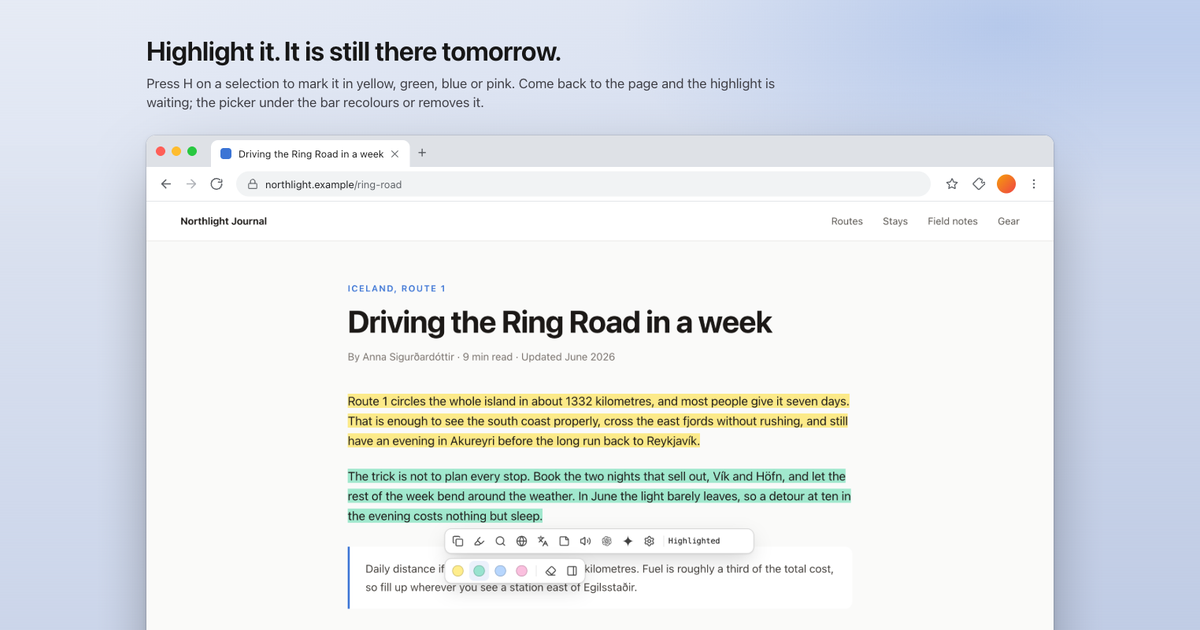
Highlights: press H to mark text in yellow, green, blue or pink. Open the page tomorrow and it is still highlighted. Alt+Shift+H opens a sidebar with every highlight, search, a note on each, and Markdown export.
Notes: press Alt+Shift+N for a sticky note that follows you across tabs.
Every action has a single-key shortcut. Free, no account needed. The toolbar reads only the text you select, never the page. Optional Premium syncs highlights and notes across browsers.
Comments
Be the first to comment.
More Products

Rollout
The YouTube upload autopilot for music producers.

NotchLive
Live captions that stay local to your Mac

BrowsePad
Redefining Web Browsing on Android TV

The Prompter and Go!
Optimize your prompts instantly with cloud AI

Time Precision
Free world-clock widget for Windows — pin every timezone to a slim screen-edge rail.

LumaDisk
Visualize disk space, identify large files, and reclaim storage fast on Mac and Windows